




Top10VPN is editorially independent. We may earn commissions if you buy a VPN via our links.
The Best VPNs to Bypass NBA League Pass Blackouts
Simon Migliano
Simon Migliano is a recognized world expert in VPNs. He's tested hundreds of apps and his research has been featured on the BBC, The New York Times, and more. Read full bio
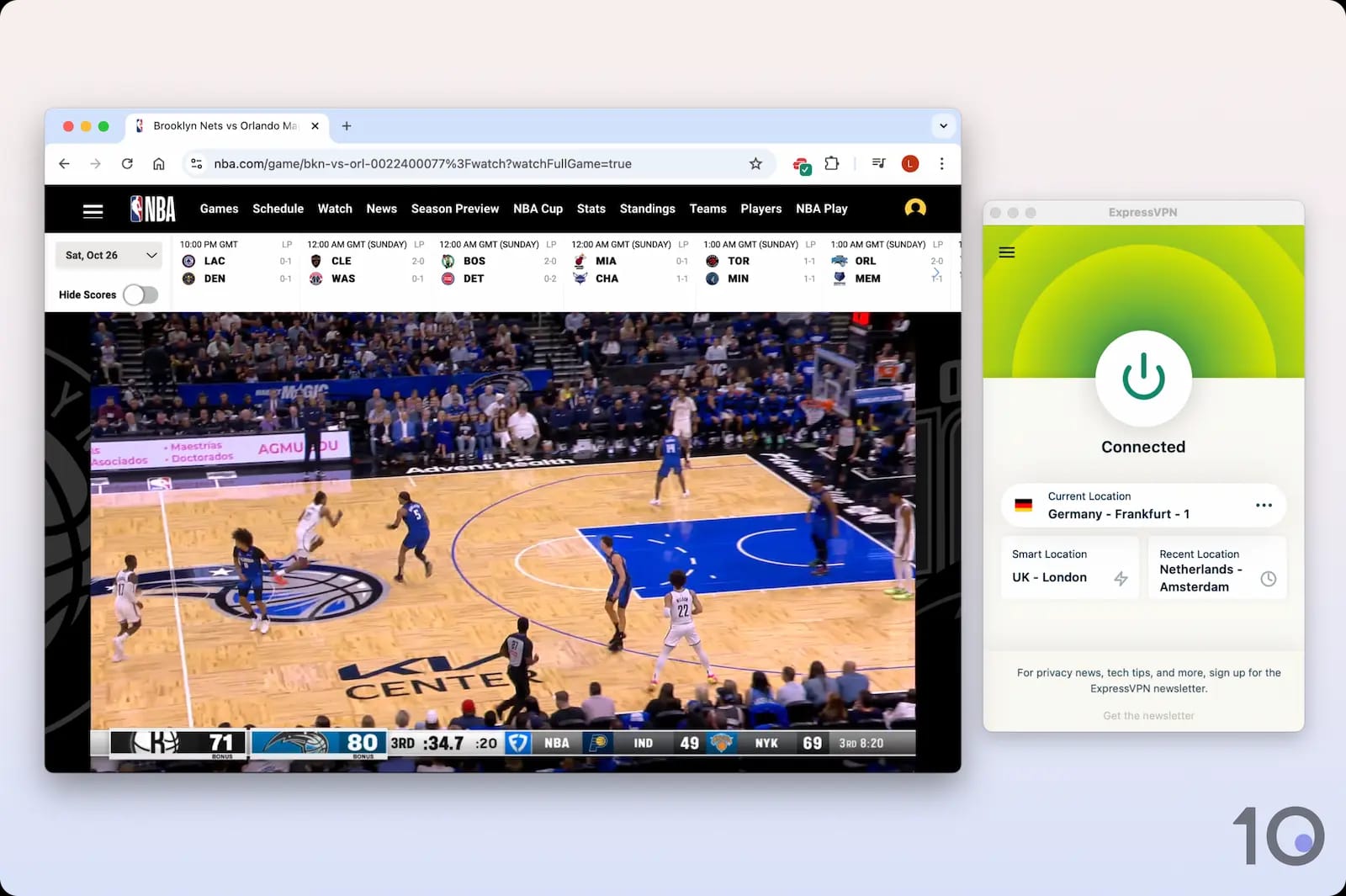
To bypass blackouts on NBA League Pass, connect to a VPN location outside the US or Canada. ExpressVPN is the best VPN to use: its “Germany – Frankfurt – 1” server consistently avoids the 7027 error code, and streams every game uninterrupted. Surfshark is a cheaper yet slower alternative.
NBA League Pass is licensed to show every regular season, Playoff, and Finals game, but due to broadcast agreements it blacks out your local team’s games and those televised nationally.
The service enforces this by looking up your US IP location, but you can get around it by using a virtual private network (VPN).
A good VPN can change your online location to one outside the blackout area. Only a few VPNs can still beat NBA League Pass geo-blocks, though.
Summary: Best VPNs for NBA League Pass
Of the 60 VPNs we tested, only three continue to work consistently with League Pass:
We’re fully independent and have been reviewing VPNs since 2016. Our ratings are based on our own testing results and are unaffected by financial incentives. Learn who we are and how we test VPNs.
VPNs Tested
60
Total Hours of Testing
30,000+
Combined Years of Experience
50+
The Best VPNs for NBA League Pass
After testing 60 VPNs with NBA League Pass, we identified three that worked best to live stream blackout NBA games: ExpressVPN, Surfshark, and Windscribe.
You can compare them side by side in the table below:
Servers in 50 US states for beating local blackouts
109 countries covered for NBA League Pass International access
Fast streaming speeds & no buffering mid-game
User-friendly Android TV, Apple TV & Fire TV apps
7-day free trial via mobile & 30-day refund policy
Pricier than Surfshark on longer-term plans
Android app lacks GPS spoofing
MediaStreamer doesn’t work with NBA League Pass
Pricing Plans
$12.99/mo
$4.99/mo over 15 months
$2.79/mo over 28 months
Countries with Servers
109
Servers
13,360
Simultaneous Connections
10
Support
24/7 Live Chat
Compatible with
Windows
Mac
iOS
Android
Linux
Amazon Fire TV
Android TV
Apple TV
Router
Chrome
ExpressVPN was the fastest and most consistent VPN at bypassing blackouts on NBA League Pass.
Its high-speed servers in 109 countries, including 50 US states, worked exceptionally well, both in the United States and abroad.
ExpressVPN’s reliable performance, backed by best-in-class apps, was head and shoulders above the competition.
ExpressVPN is fast enough to live stream games in HD.
It’s a versatile VPN, too — we’ve used it to successfully stream out-of-market NFL games and bypass blackouts on MLB.TV and ESPN Select (ESPN+).
ExpressVPN servers that worked best with League Pass:
For bypassing local blackouts: New York, Atlanta
For bypassing national blackouts: Frankfurt – 1, The Hague
Streams In-Market & Out-of-Market Games
ExpressVPN streamed blackout NBA games on both US and international servers.
The benefit of using US servers to beat local blackouts is that you’ll get the fastest streaming speeds, given the shorter distances involved.
By contrast, connecting to servers abroad will give you access to every blacked-out NBA game, including those televised nationally.
See how ExpressVPN compares to its main competitors in the table below:
Table comparing ExpressVPN’s performance with its rivals.
VPN Service
US Server
International Server
ExpressVPN
Yes
Yes
NordVPN
Yes
No
Surfshark
Yes
No
Windscribe (Free)
No
Yes
To avoid local blackouts, we connected to a streaming-optimized server in one of the 50 US states it offers — spanning both the East and West coasts.
To avoid national blackouts, we connected to a server location outside of the US or Canada. We recommend Germany, which is subject to fewer blackouts.
Connecting to servers is quick and simple thanks to well-designed and user-friendly software.
Simply open up the app, tap the chevron next to the ‘Selected Location’ button, and choose your preferred city or country from the server list.
ExpressVPN’s server list on mobile.
Faster than All Other League Pass VPNs
In our NBA League Pass speed tests, ExpressVPN performed better than every other VPN.
Live video streams always loaded at maximum resolution, and without buffering.
While connected to server locations in Europe, our internet speed slowed down by only 13%, which you’ll barely notice on a fast connection.
And connecting within the US, the impact on our internet speed was even lower: 2% connecting to a nearby state, and 10% connecting to the other side of the country.
International servers couldn't bypass national blackouts
Smart DNS doesn’t work with NBA League Pass
Pricing Plans
$15.45/mo
$2.98/mo over 15 months
$1.78/mo over 27 months
Countries with Servers
100
Servers
4,500
Simultaneous Connections
Unlimited
Support
24/7 Live Chat
Compatible with
Windows
Mac
iOS
Android
Linux
Amazon Fire TV
Android TV
Apple TV
Router
Chrome
Surfshark is a cheaper alternative to ExpressVPN, and it stood out for bypassing blackouts on Android devices.
That’s because the VPN’s Android app comes with a built-in GPS spoofer that gets around GPS-based restrictions.
It’s a very useful feature that will also allow you to bypass local NHL blackouts on Android smartphones and tablets.
Sadly, Surfshark proved noticeably slower than ExpressVPN, and we couldn’t get its international servers to work with NBA League Pass, meaning you won’t be able to get around national blackouts.
Surfshark can only bypass local blackout restrictions.
Surfshark servers that worked best with League Pass:
For bypassing local blackouts: Dallas, Atlanta, Ashburn
Works with NBA League Pass on Android
The NBA League Pass Android app checks your location using GPS as well as your IP address.
As connecting to a VPN server only changes your IP, almost every VPN we tested failed to stream blackout NBA games on Android.
Surfshark’s Android app includes a rare fake GPS setting that syncs your location with the VPN server’s.
The ‘Override GPS location’ setting takes a couple of minutes to set up, but once it’s activated, you’ll be able to bypass local blackouts on your smartphone or tablet.
Setting up Surfshark’s ‘Override GPS’ location setting.
ExpressVPN doesn’t offer this built-in tool. You could install a separate fake GPS app to run alongside the VPN, but it’s so much easier to use Surfshark’s integrated feature.
Doesn’t Beat National Blackouts
The big problem with using Surfshark is that none of its international servers were compatible with NBA League Pass.
Every foreign server we tested, including Germany, Japan, and the UK, always triggered the 7027 error message.
In other words, Surfshark is currently unable to bypass national blackouts.
At least, many of the VPN’s 24 US VPN locations worked to beat local blackout restrictions.
Windscribe is the only secure free VPN that worked with NBA League Pass. All the others we tested, including Hotspot Shield and Proton VPN, failed.
That being said, only the Frankfurt (Germany) server worked. All the other servers were detected and blocked by NBA League Pass.
Windscribe is the only free VPN that works with NBA League Pass.
Extremely Limited Server Options
In our tests, we could only stream blacked out NBA games using Windscribe’s free server in Germany.
All its other free server locations, like the UK and the US, were instantly blocked.
While this allowed us to access NBA League Pass International from the US, we were limited to that one location.
Connecting to that server in Germany from the US saw our speeds drop by 20%.
On top of that, the connection was inconsistent throughout, leading to occasional blurriness and even buffering.
On a more positive note, Windscribe’s free app comes with a fake GPS setting for Android. Although it wasn’t as easy to set up as Surfshark’s, it still successfully spoofed our GPS data.
10GB Monthly Data Cap Is Frustrating
Windscribe is completely free to use. You don’t have to submit payment details, and you’re not constantly pushed to upgrade to a premium subscription.
But, the free service comes with a number of restrictions: namely, very few server locations, and a 10GB monthly data allowance.
We found this data cap sufficient for streaming one or two games at most. The NBA app automatically adjusts your resolution, so we weren’t able to choose a lower resolution to save data.
As such, we only recommend Windscribe for watching a one-off blackout game. For regular access to NBA League Pass from anywhere, you’ll have to use a paid VPN with unlimited bandwidth.
EXPERT ADVICE: Despite claims from other websites, you don’t need to sign up for an international NBA League Pass account. Our methods for bypassing NBA blackouts work with your existing US-based account.
We found that you can watch nationally blacked-out games on NBA League Pass, like those covered by ESPN in the US, by connecting to a VPN server in Germany.
For games subject to local blackout restrictions, we recommend connecting to a server in a nearby state instead. That way, your download speeds will remain as fast as possible.
To help you find the best server and VPN service for what you want to watch, use the table below:
Broadcast Channel
Blackout Region
Best VPN Server Location
Compatible VPNs
NBA League Pass & NBA TV
Local
Nearby state
ExpressVPN, Surfshark
ESPN, TNT, ABC
National
Germany
ExpressVPN, Windscribe
Watch us using ExpressVPN to change our IP location on NBA League Pass in the video below:
Using a VPN to bypass blackouts on NBA League Pass.
In the sections below, we’ll walk you through how to bypass NBA League Pass blackouts on various platforms.
PC & Mac
To watch every NBA game on Windows and Mac, simply connect to a VPN server outside of the blackout territory and open NBA League Pass in your web browser.
How to Use a VPN with NBA League Pass on PC & Mac
Get a VPN that works with NBA League Pass:ExpressVPN was the most consistent in our tests.
Open the VPN app and connect to a server outside the blackout region: For locally blacked-out games, connect to a server in a nearby US state. For nationally blacked-out games, connect to a server in the Netherlands or Germany.
Open NBA League Pass in your web browser: You can use your existing US-based NBA account.
Select the game you want to watch and start streaming: If the video doesn’t load or you encounter an error message, try our workarounds below.
Android Devices
On the mobile app, NBA League Pass looks up your location by using your device’s GPS data, not your IP address location.
Therefore, the vast majority of VPN services won’t work.
Thankfully, a few VPNs can spoof your GPS location on Android devices. Surfshark and Windscribe are the only NBA League Pass VPNs that have this feature.
How to Use a VPN with NBA League Pass on Android
Sign up for a VPN with GPS spoofing functionality: We recommend Surfshark because of its good US server network.
Install the VPN app by downloading it from the Google Play Store.
Log in to your account and turn on Override GPS Location:Settings > VPN Settings > Advanced Settings > Override GPS Location > Let’s Go.
Reveal Developer Options on your device: Navigate your device’s Settings > About Phone > Software Information > tap Build Number seven times.
Grant the VPN app GPS privileges: Reopen the Settings app > Developer Options > Select Mock Location App > VPN name (e.g. Surfshark)
Open the VPN app and connect to a server where the game is not blacked out: Your GPS coordinates will automatically match the location of the VPN server.
Clear cache on the NBA app: Open Settings > Apps > NBA > Storage > Clear cache.
Open the NBA app and select the game you want to watch: You’ll now have access to blacked-out games on the service.
iPhone & iPad
Watching blackout games through the NBA app on iPhone or iPad is effectively impossible.
Both apps check your GPS location and — unlike Android — iOS doesn’t allow third-party apps to override your device’s GPS coordinates.
The workaround is to skip the app entirely and access NBA League Pass in mobile Safari instead.
The web player looks up your IP address rather than your GPS data, so a VPN can successfully place you outside the blackout region.
How to Use a VPN with NBA League Pass on iPhone & iPad
Sign up for a VPN that works with NBA League Pass.
Install the VPN app from the App Store and connect to a server outside the blackout area.
Disable Safari’s “Hide IP Address” setting: Go to Settings > Apps > Safari > Hide IP Address and select Off. If this is left on, it can interfere with the VPN’s IP and trigger the 7027 error.
Turn off Location Services for Safari: Go to Settings > Privacy & Security > Location Services > Safari Websites and select Never. This stops nba.com from reading your real coordinates via the browser’s geolocation API.
Open Safari and go to nba.com: Sign in with your existing US-based NBA account.
Request the desktop site: Mobile links on nba.com often try to open up the NBA app, so tap the aA icon in the address bar and select Request Desktop Website.
Select the game you want and start streaming. If playback stalls or you see an error, try closing the tab, reconnecting to the VPN, and reopening nba.com in a Private Browsing window.
Android TV, Apple TV & Fire TV
Watching blackout NBA games is easy on TV streaming devices.
As long as your VPN has an app for these devices, simply open the app and connect to a server location where the game isn’t blacked out.
How to Use a VPN with NBA League Pass on TV
Sign up to a reliable VPN: We recommend ExpressVPN for streaming devices.
Download the VPN app from the app store: You can use your US or Canada Amazon, Apple or Google account, so you won’t need to create a new one.
Open the app and connect to a VPN server outside the blackout region.
Clear cache on the NBA app: On Fire TV, go to Settings > Applications > Manage Installed Applications > Clear Cache. On Android TV, go to Settings > Apps > See all apps > NBA > Clear cache > Ok. On Apple TV, restart the device.
Open the NBA app and live stream the game you want to watch.
Roku & Chromecast
You can’t install VPN software on Roku and most Chromecast devices. These devices don’t support manual DNS address changes either, so Smart DNS proxies won’t help.
The easiest way to use a VPN on Chromecast and Roku is to set up a virtual router from your Windows PC.
How to Use a VPN with NBA League Pass on Roku & Chromecast
Sign up to either ExpressVPN or Surfshark.
Download the VPN app onto your Windows computer.
If you’re using a Chromecast, download the NBA app onto your mobile: You won’t need to do this on Roku.
Enable your PC’s mobile hotspot: Go to Settings > Network & Internet > Mobile hotspot and toggle to On.
Make a note of your network name and password: If you want to change them, click Edit, make your changes, and click Save.
Locate your VPN’s TAP adapter: Navigate to Settings > Network & Internet > Status > Change Adapter Options. Right-click on your VPN’s TAP adapter and select Properties.
Edit your sharing settings: Click the Sharing tab and tick the box that says “Allow other network users to connect through this computer’s internet connection.”
Select your hotspot: From the drop-down menu entitled Home networking connection: select Local Area Connection*.
Using the Windows VPN app, connect to a server outside of the blackout region: Your mobile hotspot will automatically broadcast this server location.
Connect your Roku or Chromecast to your mobile hotspot network: You can do this from the Settings app on Roku or use the Google Home app on your phone for Chromecast.
Open the NBA app on Roku or cast from the NBA mobile app for Chromecast: You’ll now be able to access every game on NBA League Pass.
Use our table below to find out which popular NBA teams you’re blocked from watching, based on your real location or the location of your VPN server’s IP address.
To watch your team, simply connect to a VPN server in one of our recommended locations.
Table showing which teams are blacked out in which locations.
IP Address Location
Blacked Out Team
Recommended VPN Server Location
Boston
Boston Celtics
New York City, Philadelphia, Toronto
Brooklyn
Brooklyn Nets
New York City, Philadelphia, Toronto
Chicago
Chicago Bulls
Milwaukee, Detroit, Toronto
Dallas
Dallas Mavericks
Houston, Austin, Los Angeles
San Francisco
Golden State Warriors
Seattle, Las Vegas
Houston
Houston Rockets
New Orleans, Memphis
Los Angeles
Los Angeles Lakers
Las Vegas, Phoenix
Miami
Miami Heat
Atlanta, New Orleans
Philadelphia
Philadelphia 76ers
New York City, Washington D.C.
Toronto
Toronto Raptors
Detroit, Buffalo
Make sure to connect to a VPN server from one of our recommended VPNs. If you don’t, your VPN IP address will likely be blocked by NBA League Pass.
EXPERT ADVICE: If you’re blocked from watching a game while connected outside your team’s blackout area, make sure your IP address isn’t within the opposing team’s blackout region.
How to Fix Your League Pass VPN Not Working
If your VPN isn’t working with NBA League Pass, most often it’s because the IP address of the VPN server you’re connected to has been blocked.
The most effective fix is to use one of our VPN picks and connect to a working server. Then, open NBA League Pass in a private browsing window, as this prevents your browser from storing cookies and cache.
Below we’ve outlined specific instructions on how to work around the two most common NBA League Pass error codes.
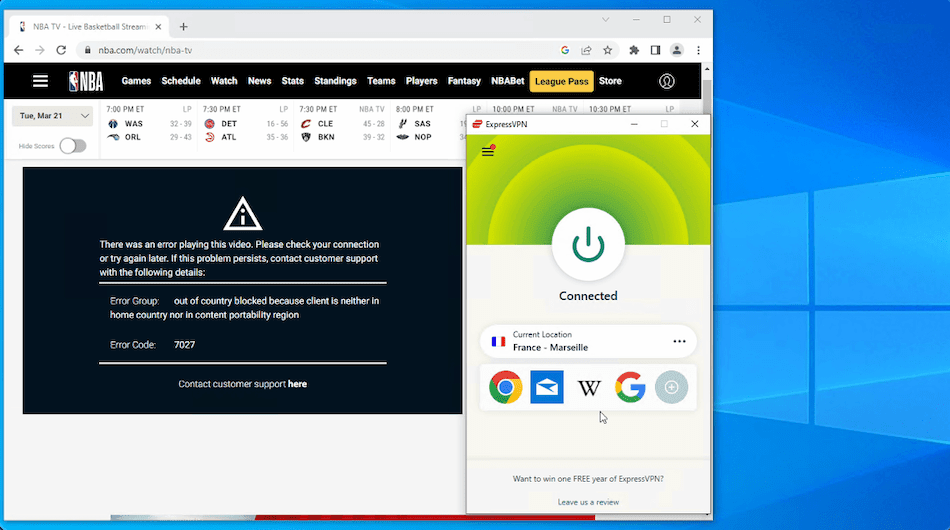
Error Code 7027: Out of country blocked because client is neither in home country nor in content portability region
NBA League Pass error code 7027.
NBA League Pass displays the 7027 error message when it detects a VPN connection. To fix this, you’ll have to use one of the VPNs we recommend, such as ExpressVPN, and connect to a server location outside the blackout area.
Error Code 3312: Content restricted for geolocation
NBA League Pass error code 3312.
You’ll see the 3312 error message if your IP address is inside the blackout region. To get around this, connect to a VPN location where the game is available on League Pass.
You can view the regions where the most popular teams are blacked out in our summary table.
Popular VPNs We Don’t Recommend
NBA League Pass imposes stricter VPN blocks than most other streaming services. ExpressVPN, Surfshark, and Windscribe were the only VPNs that met or exceeded our testing criteria.
As you’d expect, a VPN automatically failed our tests if it couldn’t stream any blacked-out NBA games.
We also excluded VPNs for other reasons, like poor streaming quality, limited device compatibility, and disappointing download speeds.
Here are three very popular VPNs we tested, and the reasons why they didn’t make our recommendations list:
NordVPN
Reason for exclusion:
International servers blocked by NBA League Pass
No GPS spoofing functionality
NordVPN couldn’t bypass national blackouts.
Although other VPN review websites state that NordVPN is the best VPN for NBA League Pass, our tests found that, unlike ExpressVPN, NordVPN can’t get around national blackouts.
Every international NordVPN server we tested was blocked by NBA League Pass. We therefore couldn’t stream any game shown on a national network.
Although NordVPN did work to bypass local blackouts, we preferred Surfshark due to its cheaper price and built-in Android GPS spoofer.
CyberGhost
Reason for exclusion:
All servers blocked by NBA League Pass
CyberGhost failed to stream any game on NBA League Pass.
CyberGhost claims that it “works perfectly with NBA League Pass,” however we couldn’t access a single live game using the VPN.
Every one of its servers in 100 countries was immediately detected and blocked.
Private Internet Access (PIA)
Reason for exclusion:
All servers blocked by NBA League Pass
PIA VPN couldn’t unblock NBA League Pass on any of its servers.
Just like CyberGhost, PIA VPN claims it “works great with NBA League Pass” on any “server location of your choice.”
Despite its vast network of 18,651 servers, we were unable to stream NBA League Pass on any of them.
How We Test VPNs for NBA League Pass
We put 60 VPN services through a tailored testing process in order to find the most effective options.
We tested each VPN with NBA League Pass across multiple popular devices. Read below exactly how we assessed and picked the best VPNs for NBA League Pass.
1. Bypassing Local Blackouts (35%)
Test Conducted: We tested and recorded each VPN’s ability to stream NBA games while connected to servers on the East and West coasts of the US.
Why It’s Important: A top NBA VPN should be able to bypass local blackouts, like those imposed by NBA League Pass and NBA TV, via a nearby server in the US. That way, you can maintain the fastest possible internet speeds.
Optimal Result: Consistent access to NBA League Pass on the East and West coast of the US alongside a large US server network.
2. Bypassing National Blackouts (35%)
Test Conducted: We tried to access games subject to national blackout restrictions while connected to VPN servers outside the US and Canada. We recorded the result for each VPN.
Why It’s Important: To ensure access to every blacked-out NBA game, including those on ESPN and TNT.
Optimal Result: Works to unblock NBA League Pass in at least two server locations outside of North America.
3. Speed (20%)
Test Conducted: We performed hundreds of speed tests while connected to each VPN’s servers in the US, as well as in international locations like Germany and the Netherlands.
Why It’s Important: Fast download speeds are essential for streaming NBA games in HD without any buffering.
Optimal Result: An average download speed loss of less than 10% on short-distance connections, and less than 20% connecting to locations further afield.
4. Device Compatibility (10%)
Test Conducted: We downloaded each VPN’s software on every possible platform. If available, we also installed it on a router and tested its Smart DNS functionality.
Why It’s Important: To access geo-blocked NBA games on all of your devices, a VPN has to provide extra features for devices that don’t support VPN apps. Like Smart DNS functionality for Smart TVs and a GPS spoofing tool for Android.
Optimal Result: VPN apps with a GUI for router, mobile, desktop, and streaming devices. Plus, a Smart DNS tool and GPS spoofing capabilities on Android.
Data Cap Penalty
We apply a penalty to the VPN’s final overall rating for Disney+ based on its data cap:
Unlimited bandwidth: No deduction to the overall rating
10GB per month: -20% to the overall rating
500MB per day: -25% to the overall rating
5GB per month: -30% to the overall rating
1GB or 2GB per month: -35% to the overall rating
200MB per day: -40% to the overall rating
500MB per month: -50% to the overall rating
FAQs
Why Are NBA Games Blacked Out?
NBA League Pass enforces two types of blackout restrictions.
Firstly, games shown on national TV channels, like ESPN, aren’t available to stream anywhere in the US.
Secondly, games shown on NBA TV or local TV channels, like regional sports networks (RSNs), aren’t available in out-of-market areas, but are accessible elsewhere.
These restrictions are enforced to protect the NBA’s revenue from TV contracts with broadcasters, like ESPN and RSNs.
These deals are the biggest source of revenue for the NBA, which is why they’re still in place.
Are Playoff & Finals Games Blacked Out?
Yes, Playoff games after Round 1, as well as the NBA Finals, are blacked out on NBA League Pass in the US and Canada. This is because these games will be shown on national TV.
Why Are NBA TV Games Blocked in My Area?
Every NBA League Pass subscription includes NBA TV, but you may be blocked from accessing some games if you’re not using a VPN.
If you’re being blocked from NBA TV, it’s because the game is being simulcast by an RSN in your region.
For example, if a game is being simultaneously broadcast by NBA TV and the YES Network, you won’t be able to access either stream if you’re in Brooklyn.
To bypass this, simply connect to a VPN server located in a different market, like Los Angeles or Washington D.C.